Autonomous monitor
herd monitor runs a Claude-powered agent as a long-lived daemon that operates your sweep for you. Start it once, walk away, and direct it from Discord. Recommended for any sweep longer than a few minutes.
What it does
- Staged rollout. Trial 0 first as a canary, then trials 1–2, then the rest. One bad launcher script doesn't waste the whole array.
- Failure triage. On host OOM the agent bumps
slurm.memand resubmits. On TIMEOUT it bumpsslurm.time. CUDA OOM is notified, not retried (slurm.memdoesn't help GPU memory). Recurring identical exceptions halt the loop — likely a code bug worth your attention. - Two-way Discord channel per sweep — auto-created on startup. Mention the bot for free-form questions; use slash commands for deterministic actions.
- Wakes on activity. Trial failures, completions, and Discord replies trigger a tick within seconds, not on a polling timer.
- NaN/inf-only kill policy for live trials. Anything else suspicious gets a warning, not an action.
Setup (one-time)
Python 3.10+ is required for the daemon. Trial training code can still run on older Python — they're separate environments.
Anthropic credentials
The agent talks to Claude through the Claude Agent SDK, which needs auth one of two ways:
- API key (recommended for servers) — sign in to https://console.anthropic.com, fund the workspace, create an API key, and
export ANTHROPIC_API_KEY=...on the daemon's machine. Pay-per-token, separate from your Claude Code subscription. Works on any server with no Claude Code install needed. - Claude Code subscription OAuth (works on dev machines that already have Claude Code) — leave
ANTHROPIC_API_KEYunset, and runclaude /loginonce on the same machine that will run the daemon. The SDK uses the stored tokens; usage counts against your Claude Code session limits.
The startup check prints which path is active. To switch from one to the other, set/unset ANTHROPIC_API_KEY and restart.
Discord bot
Create a Discord bot once by walking through Discord setup. After that, you'll have:
- a
DISCORD_BOT_TOKENenv var on the machine that runs the daemon - a Discord server (guild) ID you'll add to each sweep:
Per-workspace .env (recommended)
Drop a .env file in each workspace directory for tokens, experiment tags, and any other env vars the trial code or daemon needs. The daemon reads it on startup and applies any keys not already set in the shell:
# my_workspace/.env
DISCORD_BOT_TOKEN=...
ANTHROPIC_API_KEY=sk-ant-...
WANDB_API_KEY=...
EXPERIMENT=1b_production
Then just herd monitor my_workspace — no source .env step needed. CLI prefixes (FOO=bar herd monitor ...) still take precedence, so you can override per-launch when debugging. Add .env to .gitignore if your workspace is tracked.
Run
From your sweep workspace:
The daemon connects to Discord, creates a #<sweep-name> channel inside your server, and posts there. If your workspace doesn't have a manifest yet (you just wrote the YAML), the daemon materializes one for you — no herd run --dry-run step required up front.
The daemon runs in the foreground. Wrap in tmux or nohup to outlive a logout:
The setup interview
On a fresh sweep, the agent asks 3 short questions in the channel, one per message. Reply by @-mentioning the bot or replying to its message:
- What are you optimizing?
maximize <metric>/minimize <metric>/none. - On failures:
remediateornotify? Whether to auto-bump mem/time and resubmit, or just alert you. - Where do I read the metric?
wandb/results-json/none.
Reply defaults / skip to bypass the rest of the interview and start immediately with safe defaults (metric=none, remediation=notify).
If trials are already running when you launch the daemon, the agent recognizes the hot-reload case: it asks only questions 1 and 2, skips the canary, and jumps straight to operating the in-flight sweep. If every trial is already terminal, you get a postmortem instead — summary post, ask "rerun anything, or halt?", end.
Operating from Discord
Two interaction styles in your sweep's channel.
Slash commands — deterministic, no agent involvement
Type / and Discord shows the autocomplete list:
| Command | What it does |
|---|---|
/status |
Sweep totals + per-trial table |
/stats |
Per-trial timing + memory usage |
/params |
Sweep config: parameters, grid, every trial combo |
/info |
Daemon metadata: phase, uptime, tick count, total cost |
/plan |
The agent's MONITOR_PLAN.md contents |
/run <index> |
Submit (or resubmit) one trial |
/run_all |
Submit every ready trial |
/stop <index> |
Cancel one trial (resubmitted on the next herd run) |
/stop_all |
Cancel every live trial |
/pause <index> |
Pause one trial — graceful and resumable (SH-aware); status becomes paused |
/prune <index> [reason] |
Algorithmic kill — terminal, NOT resubmitted by herd run |
/tail <index> [lines] |
Last N lines of a trial's stderr |
/shutdown |
Stop the daemon entirely |
/help |
List of these commands |
The three trial-stopping commands differ by intent: /stop cancels (resubmittable), /pause stops gracefully and keeps the trial resumable (paused — used by successive halving), and /prune is a terminal kill that herd run will never resurrect.
These run locally against the workspace and post the answer in the channel. No model call, no spend.
Mentions and replies — free-form, wakes the agent
For anything that needs reasoning (cadence changes, remediation overrides, status questions), @-mention the bot or reply to one of its messages:
@HerdDog please bump mem to 16G and resubmit failed trials
@HerdDog why is idx 3 stuck?
HerdDog: pause until tomorrow
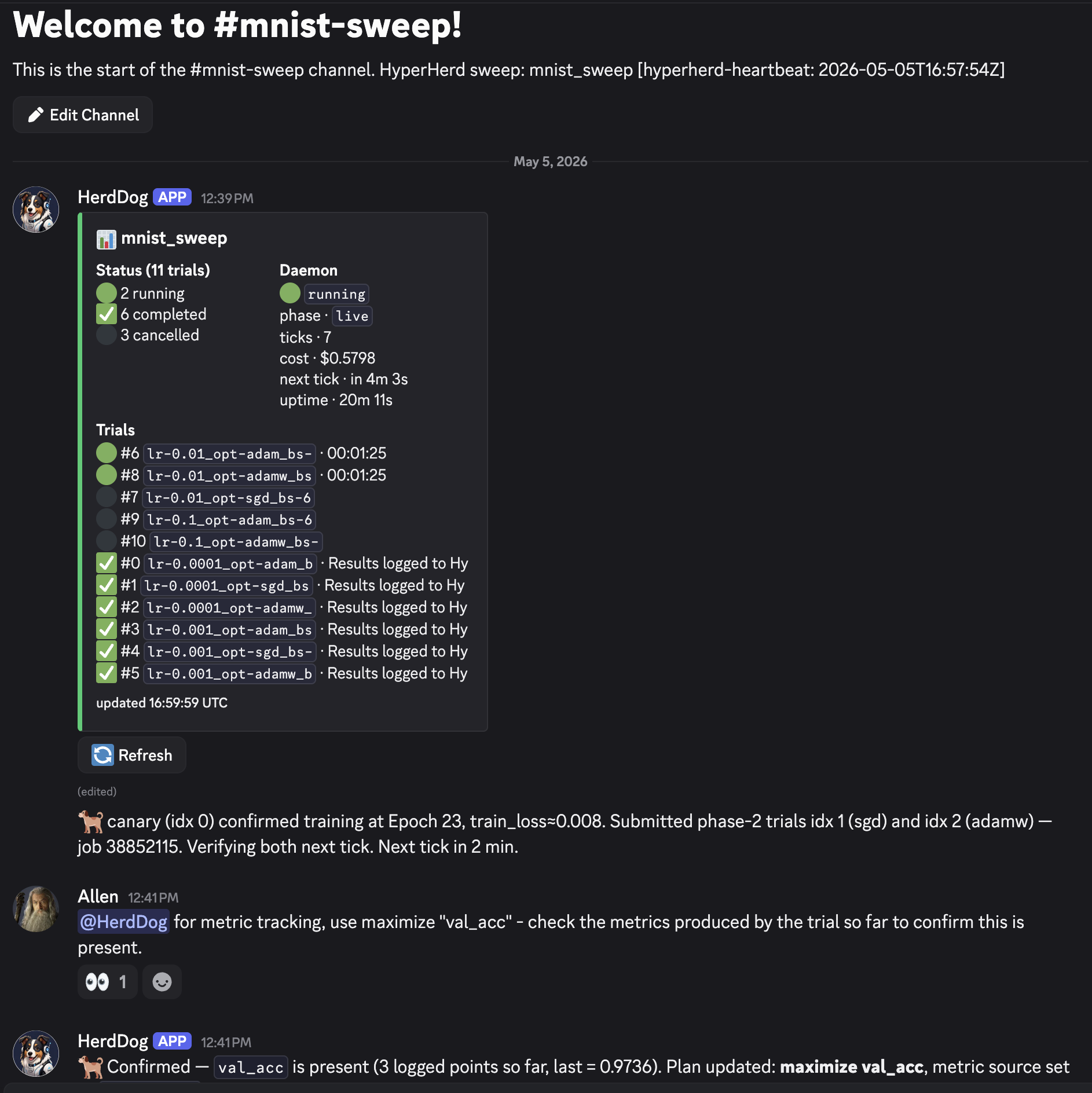
The bot reacts 👀 to confirm receipt; the agent processes on its next tick (usually within a second or two). While the agent is working, Discord shows "BotName is typing…" at the bottom of the channel.
The agent understands phrases like:
| You say | Effect |
|---|---|
pause / stop / halt |
Halts the loop. Daemon exits. |
bump mem to 16G / give it more time |
Edits slurm.mem / slurm.time, resubmits affected trials. |
set metric to val_acc |
Updates the plan's metric source. |
how's it going? |
Posts a fresh status summary. |
| anything unclear | Asks one specific question and waits. |
What you'll see during a sweep
Every channel post wears an emoji prefix so you can tell at a glance who's speaking:
| Prefix | Source | Cost |
|---|---|---|
| 🐕 | The agent (decisions, replies, tick summaries) | Model spend per tick |
| ▶️ ✅ ⚠️ | SLURM poller — trial transitions (running / completed / failed) | Free |
| 🐾 | Periodic daemon heartbeat with current totals (every 5 min) | Free |
| 🛑 | Final daemon-stopped notification | Free |
Each agent tick posts one summary message, even on quiet ticks — silence means the daemon crashed. Tick cadence is adaptive: 2–5 min during rollout and just after activity, 30–60 min steady-state. Every agent message ends with a Next tick in <duration> countdown.
🐕 tick clean — 4 running, 5 completed, 0 failed. Next tick in 30 min.
🐕 bumped slurm.time 1h→1h30m after 1 TIMEOUT (idx 3); resubmitting. Next tick in 5 min.
Failure triage
| SLURM cause | Cause type | If remediate |
If notify |
|---|---|---|---|
OUT_OF_MEMORY |
Host RAM exceeded | Bump slurm.mem 50%, resubmit |
Notify only |
RuntimeError: CUDA out of memory |
GPU VRAM | Notify only, even in remediate mode |
Notify |
TIMEOUT |
Wall-clock too short | Bump slurm.time 50%, resubmit |
Notify |
NODE_FAIL / preemption |
Infrastructure | Resubmit unchanged | Notify |
| Same exception ≥ 2 trials | Code/env bug | Halt the loop | Same |
Auto-bumps are capped at one per failure class per sweep. If a 50% mem bump still OOMs, that class switches to notify mode for the rest of the sweep.
Successive halving
If the sweep configures a successive_halving: block, the monitor's metric-based stopping is handled by the deterministic SH algorithm instead of the agent's judgment-based pruning. On each scheduled tick while trials are running, the agent calls its run_sh tool (which runs herd sh) and reports what changed:
🐕 SH @ rung 10: pruned idx 3, 7 (below the cut); paused idx 5 until the field
catches up. Totals — 4 running, 2 paused, 4 completed, 2 pruned. Next tick in 30 min.
paused is intentional and resumable — not a failure. A paused trial may be resumed automatically by a later run_sh once enough peers reach its rung, or you can resume it yourself with herd run <index>. The agent won't also judgment-prune on metrics when SH is configured (that would double up); it reserves /prune for things SH doesn't cover, like an immediate NaN explosion.
You can drive SH by hand too — herd sh --dry-run previews the decisions, herd sh applies them — independent of whether the daemon is running.
Stop, restart, override
/shutdown from Discord stops the daemon and posts a final summary. From the terminal: SIGINT (Ctrl-C in the foreground) or SIGTERM does the same.
To re-run the setup interview from scratch: rm <workspace>/.hyperherd/MONITOR_PLAN.md then herd monitor.
The daemon writes an audit log of every tool call to <workspace>/.hyperherd/agent_log.jsonl if you need to retrace what the agent did.
Tweaking the agent's behavior
The agent's playbook lives in hyperherd/monitor_agent/prompt/monitor.md inside the package. If you want to change cadence, triage policy, or interview questions, edit it and restart the daemon.
Authoring the sweep itself
herd monitor operates a sweep — it doesn't author the YAML. For that, install the Claude Code skill and ask Claude to write the config. Two different shapes of work: open-ended codebase exploration (skill) vs. closed-loop automation (daemon).